
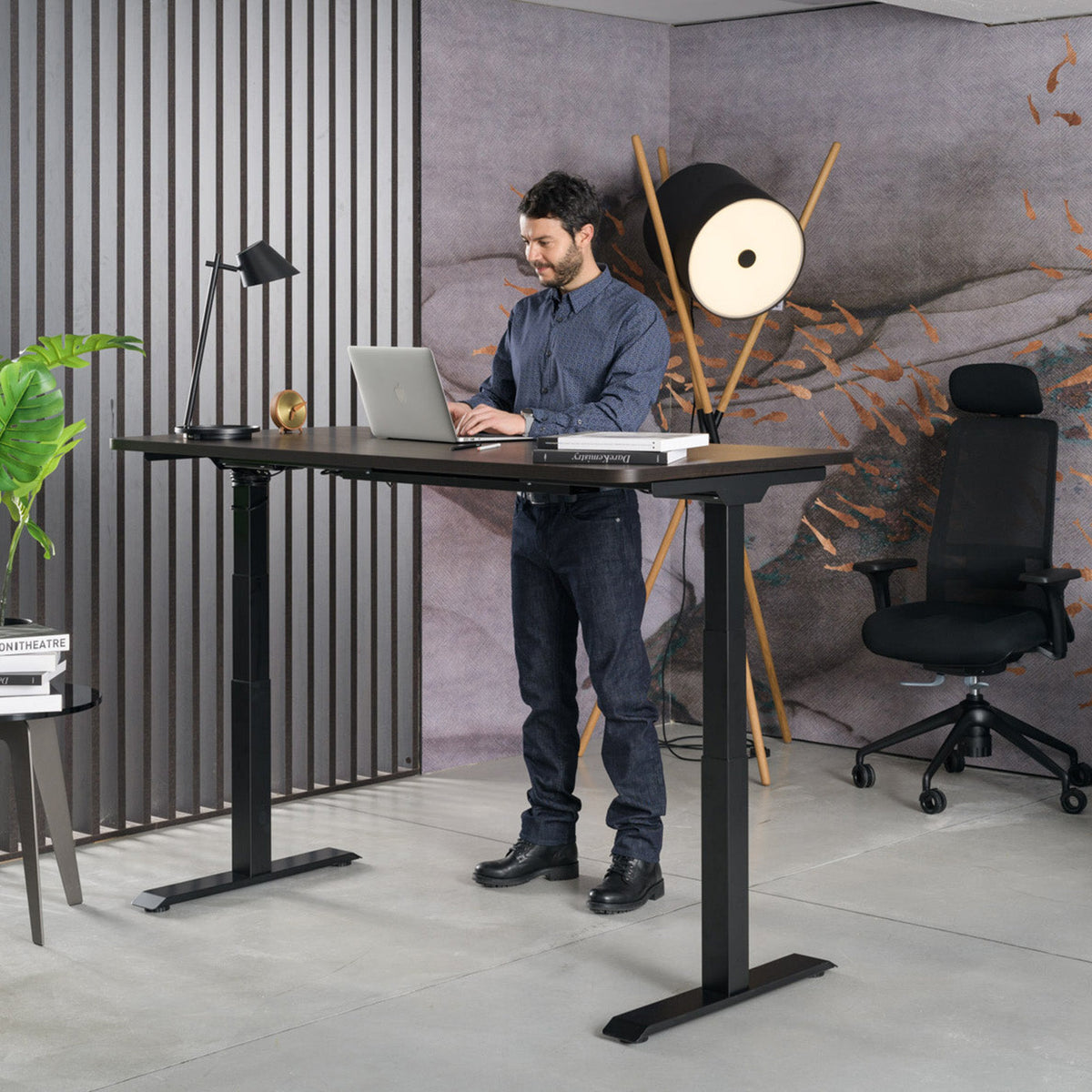
A custom standing desk for the home is an electric desk where you choose the desktop size, the finish and the frame colour yourself, so it fits the room and the furniture. With CoreLift you do this in the 3D configurator: a desktop from 120 to 200 cm long and 70 to 90 cm deep, six finishes and three frame colours; the dual motor raises the desktop from 60 to 125 cm.
This guide is for anyone setting up a desk in a home office, a work corner in the living room or a student's room. General criteria such as one or two motors, load capacity and the controller are covered in the guide how to choose a standing desk. Here we go through the three decisions you make yourself with a custom desk: size, finish and motor.
How do you choose the desktop size for a room at home?
Choose the desktop size based on the equipment on the desk and the space you have. The length determines how many screens and documents you have in front of you, the depth determines the distance to the screen.
| Use | Starting point for the desktop | Note |
|---|---|---|
| Laptop and one screen | 120–140 × 70–80 cm | For a smaller room or a corner by the window |
| Two screens | 160 × 80 cm | Enough space for a keyboard and documents |
| Drawing, plans, many documents | 180–200 × 80–90 cm | More depth for large screens |
CoreLift desktops come in 10 cm steps in length (from 120 to 200 cm) and 5 cm steps in depth (from 70 to 90 cm). Before choosing, also check:
- Clearance for raising: at the highest position, 125 cm, the desktop must not hit a shelf, a windowsill or a sloping ceiling.
- Space for the chair: leave enough room behind the desk to push the chair back and stand comfortably.
- Cables: enough cable length must remain under the desk for the monitor, charger and lamp at the highest position.
Which desktop finish should you choose?
Choose the finish to match your existing furniture and how hard-wearing the surface should be. CoreLift is available in:
- White, grey, black and Vicenza oak chipboard with ABS edges: durable and easy to care for, suitable for daily work.
- Oak veneer and masiva oak: two additional oak finishes.
The chipboard finishes are the same as on CoreStack cabinets, so you can match the desk and cabinet in the same shade. You choose the frame colour from white, grey and black. A light desktop with a white frame looks lighter in a small room, while a black frame with an oak finish creates more contrast.
Why does CoreLift have a dual motor?
A dual motor has its own drive in each leg, so the desktop rises evenly and in sync even with longer desktops. CoreLift carries up to 125 kg, has an electronic controller with three memory heights and a built-in anti-collision sensor that stops the movement when it meets an obstacle.
| Feature | CoreLift |
|---|---|
| Drive | Dual electric motor, synchronised lift |
| Height range | 60–125 cm |
| Load capacity | up to 125 kg |
| Controller | Three memory heights |
| Safety | Anti-collision sensor |
| Desktop | 120–200 × 70–90 cm, six finishes |
| Frame | White, grey or black |
In a home office the memory function is practical: you save your sitting and standing positions once and later select them with a single press. How long to stand each day is covered in the guide how long to stand at a standing desk.
What height range do you need?
The right desk height is the one at which your elbows, with relaxed shoulders, are level with the desktop, both sitting and standing. A range of 60 to 125 cm allows sitting and standing settings for users of different heights, so several family members can use the desk.
When you first set up the desk, set the sitting height and save it to memory. Then stand up, raise the desktop to elbow height and save that position too. Use the third memory slot for a second user.
Own production in Medvode: what it means for a custom desk
We make CoreLift in our own production facility in Medvode, Slovenia, where Hit Preless has been making furniture for hotels, offices and public buildings for more than 30 years. This lets us prepare the desktop in the size and finish you choose, with an indicative delivery time of 2 weeks from order confirmation.
You can see the desk and the finishes before buying in our showroom in Medvode, Žlebe 1. For special requirements, write to us at sales@heka-interior.com.
How does the 3D configurator work?
In the CoreLift 3D configurator you build the desk in three steps and see it straight away in the chosen version:
- choose the length and depth of the desktop,
- choose the desktop finish,
- choose the frame colour.
The preview changes colour and size, and the price is recalculated for the chosen version as you go. When you are happy, add the desk to the cart. If you are comparing several standing desks, they are all in our standing desks collection, and for the difference between electric and other versions read the guide electric standing desk.
How do you manage cables and accessories on a standing desk?
On a standing desk, route the cables so they follow the desktop as it rises. The simplest way is a cable tray under the desktop and a single power strip fixed under the desk, with only one cable running to the floor.
- A cable tray under the desktop holds power supplies and extension leads so they do not hang down.
- The single cable to the socket should be long enough for the highest position, 125 cm, with some spare length.
- Place the screen on an arm or stand so that its top edge is at eye level both sitting and standing.
Cable trays and other accessories are in our accessories. Before the first lift, check that there are no obstacles above or below the desktop; the anti-collision sensor stops the movement when it meets one.
Custom standing desk or standard version?
A standard version makes sense when your space has no constraints and a common desktop size suits you. A custom desk makes sense when the desk must fill a niche, match other furniture or carry more equipment.
| Criterion | Standard version | Custom desk (CoreLift) |
|---|---|---|
| Desktop size | A few predefined sizes | 45 combinations of length and depth |
| Finish | Predefined finishes | Six finishes, matched to CoreStack cabinets |
| Frame | Predefined colour | White, grey or black |
| Viewing before buying | Depends on the retailer | Showroom in Medvode |
Which chair goes with a standing desk?
For a standing desk, choose a chair with adjustable seat height and armrests that you can align with the desktop height. Our chairs for standing desks match the CoreLift height range, and the full range is in the office chairs category.
Frequently asked questions
How long does it take to make a custom standing desk?
The indicative delivery time for CoreLift is 2 weeks from order confirmation. We confirm the exact date when we confirm the order.
Can I see the desk in person before buying?
Yes. You can see CoreLift and finish samples in our showroom in Medvode, Žlebe 1. Please call us before your visit on +386 1 361 90 28.
What is the load capacity of the CoreLift standing desk?
CoreLift carries up to 125 kg. That is enough for two screens, a docking station, a lamp and personal items.
Can I match the desk finish to my cabinets?
Yes. The chipboard finishes are the same as on CoreStack cabinets: white, grey, black and Vicenza oak. Oak veneer and masiva oak are also available.
How high does CoreLift go?
The desktop rises from 60 to 125 cm. You save three heights in the controller and select them with a single press.
Build your desk: in the CoreLift 3D configurator choose the size, finish and frame and see straight away what the desk will look like.
Share:
Children's desk chair as a gift: how to choose